17.6 Настройка G.8032
16.7.1 Обзор
Ethernet-кольца могут обеспечивать широкополосное многоточечное подключение более экономично благодаря уменьшенному количеству соединений. Каждый узел кольца подключается к соседним узлам, участвующим в том же кольце, через два независимых канала. Связь между двумя узлами кольца называется линком кольца, а порт для такого линка называется кольцевым портом. Минимальное количество узлов в кольце — два.
Основы архитектуры защиты колец включают:
- Принцип предотвращения петель.
- Использование механизмов обучения, пересылки и таблиц адресов, определённых в функции пересылки потоков Ethernet (ETH_FF).
Предотвращение петель достигается за счёт гарантии того, что трафик может передаваться по всем линкам кольца, кроме одного. Этот конкретный линк называется линком защиты кольца (RPL), и в нормальных условиях он блокирован, т.е. не используется для передачи трафика. Ответственность за блокировку трафика через RPL несёт один из узлов, называемый владельцем RPL (RPL Owner). В случае отказа в кольце владелец RPL обязан разблокировать RPL, чтобы использовать его для передачи трафика.
В случае отказа в кольце происходит переключение на защиту трафика, которое осуществляется под управлением функций ETH_FF на всех узлах кольца.
Для координации действий защиты по кольцу используется протокол APS.
Описание принципов
- T-REC-G.8032-200806-I!!PDF-E.pdf
- T-REC-G.8032-201003-I!!PDF-E.pdf
- T-REC-G.8032-201708-I!Cor1!PDF-E.pdf
17.6.2 Топология
Топология одиночного кольца
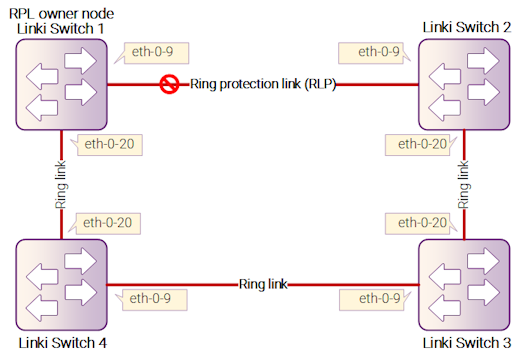
Рисунок 17-12: Топология одиночного кольца G8032
Топология множественных колец
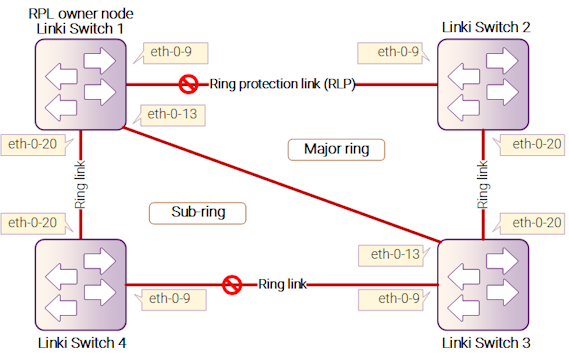
Рисунок 17-13: Топология множественных колец G8032
17.6.3 Настройка одиночного кольца
Шаг 1: Настройка Switch1
Switch# configure terminal
Enter configuration commands, one per line. End with CNTL/Z.
Switch(config)# vlan database
Switch(config-vlan)# vlan 10-100
Switch(config-vlan)# exit
Switch(config)# spanning-tree mode mstp
Switch(config)# spanning-tree mst configuration
Switch(config-mst)# instance 1 vlan 10-99
Switch(config-mst)# exit
Switch(config)# no ip igmp snooping vlan 100
Switch(config)# interface eth-0-9
Switch(config-if)# switchport mode trunk
Switch(config-if)# switchport trunk allowed vlan add 10-100
Switch(config-if)# spanning-tree port disable
Switch(config-if)# no shutdown
Switch(config-if)# exit
Switch(config)# interface eth-0-20
Switch(config-if)# switchport mode trunk
Switch(config-if)# switchport trunk allowed vlan add 10-100
Switch(config-if)# spanning-tree port disable
Switch(config-if)# no shutdown
Switch(config-if)# exit
Switch(config)# g8032 ring-id 1 east-interface eth-0-9 west-interface eth-0-20
Switch(g8032-config-switch)# rpl owner east-interface
Switch(g8032-config-switch)# instance 1
Switch(g8032-config-switch)# control-vlan 100
Switch(g8032-config-switch)# ring enable
Шаг 2: Проверка Switch1
Switch# show g8032
RingID  MajorRing  State         East      Status     West      Status
-------------------------------------------------------------------------------
1       N/A        Pending       eth-0-9   Blocked    eth-0-20  Forward

Control Vlan             : 100
Is Enabled               : Yes
Mode                     : Revertive
Node Role                : Owner
Is Sub_ring              : No
Protect Instance         : 1
RPL                      : east-interface
Wait-to-restore          : 04:26 (266492 msecs)
Hold-off Timer           : 0 (msecs)
Guard Timer              : 500 (msecs)
WTB Timer                : 5500 (msecs)
RAPS MEL                 : 7
Is Forward-to-cpu        : 1
-------------------------------------------------------------------------------
Шаг 3: Настройка Switch2
Switch# configure terminal
Enter configuration commands, one per line. End with CNTL/Z.
Switch(config)# vlan database
Switch(config-vlan)# vlan 10-100
Switch(config-vlan)# exit
Switch(config)# spanning-tree mode mstp
Switch(config)# spanning-tree mst configuration
Switch(config-mst)# instance 1 vlan 10-99
Switch(config-mst)# exit
Switch(config)# no ip igmp snooping vlan 100
Switch(config)# interface eth-0-9
Switch(config-if)# switchport mode trunk
Switch(config-if)# switchport trunk allowed vlan add 10-100
Switch(config-if)# spanning-tree port disable
Switch(config-if)# no shutdown
Switch(config-if)# exit
Switch(config)# interface eth-0-20
Switch(config-if)# switchport mode trunk
Switch(config-if)# switchport trunk allowed vlan add 10-100
Switch(config-if)# spanning-tree port disable
Switch(config-if)# no shutdown
Switch(config-if)# exit
Switch(config)# g8032 ring-id 1 east-interface eth-0-9 west-interface eth-0-20
Switch(g8032-config-switch)# instance 1
Switch(g8032-config-switch)# control-vlan 100
Switch(g8032-config-switch)# ring enable
Шаг 4: Проверка Switch2
Switch# show g8032
RingID  MajorRing  State         East      Status     West      Status
-------------------------------------------------------------------------------
1       N/A        Pending       eth-0-9   Blocked    eth-0-20  Forward

Control Vlan             : 100
Is Enabled               : Yes
Mode                     : Revertive
Node Role                : N/A
Is Sub_ring              : No
Protect Instance         : 1
Wait-to-restore          : 05:00
Hold-off Timer           : 0 (msecs)
Guard Timer              : 500 (msecs)
WTB Timer                : 5500 (msecs)
RAPS MEL                 : 7
Is Forward-to-cpu        : 1
-------------------------------------------------------------------------------
Шаг 5: Настройка Switch3
Switch# configure terminal
Enter configuration commands, one per line. End with CNTL/Z.
Switch(config)# vlan database
Switch(config-vlan)# vlan 10-100
Switch(config-vlan)# exit
Switch(config)# spanning-tree mode mstp
Switch(config)# spanning-tree mst configuration
Switch(config-mst)# instance 1 vlan 10-99
Switch(config-mst)# exit
Switch(config)# no ip igmp snooping vlan 100
Switch(config)# interface eth-0-9
Switch(config-if)# switchport mode trunk
Switch(config-if)# switchport trunk allowed vlan add 10-100
Switch(config-if)# spanning-tree port disable
Switch(config-if)# no shutdown
Switch(config-if)# exit
Switch(config)# interface eth-0-20
Switch(config-if)# switchport mode trunk
Switch(config-if)# switchport trunk allowed vlan add 10-100
Switch(config-if)# spanning-tree port disable
Switch(config-if)# no shutdown
Switch(config-if)# exit
Switch(config)# g8032 ring-id 1 east-interface eth-0-9 west-interface eth-0-20
Switch(g8032-config-switch)# instance 1
Switch(g8032-config-switch)# control-vlan 100
Switch(g8032-config-switch)# ring enable
Шаг 6: Проверка Switch3
Switch# show g8032
RingID  MajorRing  State         East      Status     West      Status
-------------------------------------------------------------------------------
1       N/A        Pending       eth-0-9   Blocked    eth-0-20  Forward

Control Vlan             : 100
Is Enabled               : Yes
Mode                     : Revertive
Node Role                : N/A
Is Sub_ring              : No
Protect Instance         : 1
Wait-to-restore          : 05:00
Hold-off Timer           : 0 (msecs)
Guard Timer              : 500 (msecs)
WTB Timer                : 5500 (msecs)
RAPS MEL                 : 7
Is Forward-to-cpu        : 1
-------------------------------------------------------------------------------
Шаг 7: Настройка Switch4
Switch# configure terminal
Enter configuration commands, one per line. End with CNTL/Z.
Switch(config)# vlan database
Switch(config-vlan)# vlan 10-100
Switch(config-vlan)# exit
Switch(config)# spanning-tree mode mstp
Switch(config)# spanning-tree mst configuration
Switch(config-mst)# instance 1 vlan 10-99
Switch(config-mst)# exit
Switch(config)# no ip igmp snooping vlan 100
Switch(config)# interface eth-0-9
Switch(config-if)# switchport mode trunk
Switch(config-if)# switchport trunk allowed vlan add 10-100
Switch(config-if)# spanning-tree port disable
Switch(config-if)# no shutdown
Switch(config-if)# exit
Switch(config)# interface eth-0-20
Switch(config-if)# switchport mode trunk
Switch(config-if)# switchport trunk allowed vlan add 10-100
Switch(config-if)# spanning-tree port disable
Switch(config-if)# no shutdown
Switch(config-if)# exit
Switch(config)# g8032 ring-id 1 east-interface eth-0-9 west-interface eth-0-20
Switch(g8032-config-switch)# instance 1
Switch(g8032-config-switch)# control-vlan 100
Switch(g8032-config-switch)# ring enable
Шаг 8: Проверка Switch4
Switch# show g8032
RingID  MajorRing  State         East      Status     West      Status
-------------------------------------------------------------------------------
1       N/A        Pending       eth-0-9   Blocked    eth-0-20  Forward

Control Vlan             : 100
Is Enabled               : Yes
Mode                     : Revertive
Node Role                : N/A
Is Sub_ring              : No
Protect Instance         : 1
Wait-to-restore          : 05:00
Hold-off Timer           : 0 (msecs)
Guard Timer              : 500 (msecs)
WTB Timer                : 5500 (msecs)
RAPS MEL                 : 7
Is Forward-to-cpu        : 1
-------------------------------------------------------------------------------
17.6.4 Настройка множественных колец Non-virtual-channel
Шаг 1: Настройка Switch1
Switch# configure terminal
Enter configuration commands, one per line. End with CNTL/Z.
Switch(config)# vlan database
Switch(config-vlan)# vlan 10-150
Switch(config-vlan)# exit
Switch(config)# spanning-tree mode mstp
Switch(config)# spanning-tree mst configuration
Switch(config-mst)# instance 1 vlan 10-99
Switch(config-mst)# instance 2 vlan 101-150
Switch(config-mst)# exit
Switch(config)# no ip igmp snooping vlan 100
Switch(config)# no ip igmp snooping vlan 20
Switch(config)# interface eth-0-9
Switch(config-if)# switchport mode trunk
Switch(config-if)# switchport trunk allowed vlan add 10-150
Switch(config-if)# spanning-tree port disable
Switch(config-if)# no shutdown
Switch(config-if)# exit
Switch(config)# interface eth-0-13
Switch(config-if)# switchport mode trunk
Switch(config-if)# switchport trunk allowed vlan add 10-150
Switch(config-if)# spanning-tree port disable
Switch(config-if)# no shutdown
Switch(config-if)# exit
Switch(config)# interface eth-0-20
Switch(config-if)# switchport mode trunk
Switch(config-if)# switchport trunk allowed vlan add 101-150
Switch(config-if)# switchport trunk allowed vlan add 20
Switch(config-if)# spanning-tree port disable
Switch(config-if)# no shutdown
Switch(config-if)# exit
Switch(config)# g8032 ring-id 1 east-interface eth-0-9 west-interface eth-0-13
Switch(g8032-config-switch)# rpl owner east-interface
Switch(g8032-config-switch)# instance 1
Switch(g8032-config-switch)# instance 2
Switch(g8032-config-switch)# control-vlan 100
Switch(g8032-config-switch)# ring enable
Switch(g8032-config-switch)# exit
Switch(config)# g8032 ring-id 2 interface eth-0-20 major-ring-id 1
Switch(g8032-config-switch)# instance 2
Switch(g8032-config-switch)# control-vlan 20
Switch(g8032-config-switch)# ring enable
Шаг 2: Проверка Switch1
Switch# show g8032
RingID  MajorRing  State         East      Status     West      Status
-------------------------------------------------------------------------------
1       N/A        Pending       eth-0-9   Blocked    eth-0-13  Forward

Control Vlan             : 100
Is Enabled               : Yes
Mode                     : Revertive
Node Role                : Owner
Is Sub_ring              : No
Protect Instance         : 1-2
Sub-ring                 : 2
RPL                      : east-interface
Wait-to-restore          : 04:26 (266492 msecs)
Hold-off Timer           : 0 (msecs)
Guard Timer              : 500 (msecs)
WTB Timer                : 5500 (msecs)
RAPS MEL                 : 7
Is Forward-to-cpu        : 1
-------------------------------------------------------------------------------

RingID  MajorRing  State           East        Status     West        Status
-------------------------------------------------------------------------------
2       1          Pending         eth-0-20    Blocked      N/A         N/A

Control Vlan             : 20
Is Enabled               : No
Mode                     : Revertive
Node Role                : N/A
Is Sub_ring              : Yes
Virtual-channel          : Disable
Protect Instance         : 2
Wait-to-restore          : 05:00
Hold-off Timer           : 0 (msecs)
Guard Timer              : 500 (msecs)
WTB Timer                : 5500 (msecs)
RAPS MEL                 : 7
Is Forward-to-cpu        : 1
-------------------------------------------------------------------------------
Шаг 3: Настройка Switch2
Switch# configure terminal
Enter configuration commands, one per line. End with CNTL/Z.
Switch(config)# vlan database
Switch(config-vlan)# vlan 10-150
Switch(config-vlan)# exit
Switch(config)# spanning-tree mode mstp
Switch(config)# spanning-tree mst configuration
Switch(config-mst)# instance 1 vlan 10-99
Switch(config-mst)# instance 2 vlan 101-150
Switch(config-mst)# exit
Switch(config)# no ip igmp snooping vlan 100
Switch(config)# interface eth-0-9
Switch(config-if)# switchport mode trunk
Switch(config-if)# switchport trunk allowed vlan add 10-150
Switch(config-if)# spanning-tree port disable
Switch(config-if)# no shutdown
Switch(config-if)# exit
Switch(config)# interface eth-0-20
Switch(config-if)# switchport mode trunk
Switch(config-if)# switchport trunk allowed vlan add 10-150
Switch(config-if)# spanning-tree port disable
Switch(config-if)# no shutdown
Switch(config-if)# exit
Switch(config)# g8032 ring-id 1 east-interface eth-0-9 west-interface eth-0-20
Switch(g8032-config-switch)# instance 1
Switch(g8032-config-switch)# instance 2
Switch(g8032-config-switch)# control-vlan 100
Switch(g8032-config-switch)# ring enable
Шаг 4: Проверка Switch2
Switch# show g8032
RingID  MajorRing  State         East      Status     West      Status
-------------------------------------------------------------------------------
1       N/A        Pending       eth-0-9   Blocked    eth-0-20  Forward

Control Vlan             : 100
Is Enabled               : Yes
Mode                     : Revertive
Node Role                : N/A
Is Sub_ring              : No
Protect Instance         : 1-2
Wait-to-restore          : 05:00
Hold-off Timer           : 0 (msecs)
Guard Timer              : 500 (msecs)
WTB Timer                : 5500 (msecs)
RAPS MEL                 : 7
Is Forward-to-cpu        : 0
-------------------------------------------------------------------------------
Шаг 5: Настройка Switch3
Switch# configure terminal
Enter configuration commands, one per line. End with CNTL/Z.
Switch(config)# vlan database
Switch(config-vlan)# vlan 10-150
Switch(config-vlan)# exit
Switch(config)# spanning-tree mode mstp
Switch(config)# spanning-tree mst configuration
Switch(config-mst)# instance 1 vlan 10-99
Switch(config-mst)# instance 2 vlan 101-150
Switch(config-mst)# exit
Switch(config)# no ip igmp snooping vlan 100
Switch(config)# no ip igmp snooping vlan 20
Switch(config)# interface eth-0-9
Switch(config-if)# switchport mode trunk
Switch(config-if)# switchport trunk allowed vlan add 101-150
Switch(config-if)# switchport trunk allowed vlan add 20
Switch(config-if)# spanning-tree port disable
Switch(config-if)# no shutdown
Switch(config-if)# exit
Switch(config)# interface eth-0-13
Switch(config-if)# switchport mode trunk
Switch(config-if)# switchport trunk allowed vlan add 10-150
Switch(config-if)# spanning-tree port disable
Switch(config-if)# no shutdown
Switch(config-if)# exit
Switch(config)# interface eth-0-20
Switch(config-if-eth-0-20)# switchport mode trunk
Switch(config-if-eth-0-20)# switchport trunk allowed vlan add 10-150
Switch(config-if-eth-0-20)# spanning-tree port disable
Switch(config-if-eth-0-20)# no shutdown
Switch(config-if-eth-0-20)# exit
Switch(config)# g8032 ring-id 1 east-interface eth-0-13 west-interface eth-0-20
Switch(g8032-config-switch)# rpl owner east-interface
Switch(g8032-config-switch)# instance 1
Switch(g8032-config-switch)# instance 2
Switch(g8032-config-switch)# control-vlan 100
Switch(g8032-config-switch)# ring enable
Switch(g8032-config-switch)# exit
Switch(config)# g8032 ring-id 2 interface eth-0-9 major-ring-id 1
Switch(g8032-config-switch)# instance 2
Switch(g8032-config-switch)# control-vlan 20
Switch(g8032-config-switch)# ring enable
Шаг 6: Проверка Switch3
Switch# show g8032
RingID  MajorRing  State         East      Status     West      Status
-------------------------------------------------------------------------------
1       N/A        Pending       eth-0-13  Blocked    eth-0-20  Forward

Control Vlan             : 100
Is Enabled               : Yes
Mode                     : Revertive
Node Role                : N/A
Is Sub_ring              : No
Protect Instance         : 1-2
Sub-ring                 : 2
Wait-to-restore          : 05:00
Hold-off Timer           : 0 (msecs)
Guard Timer              : 500 (msecs)
WTB Timer                : 5500 (msecs)
RAPS MEL                 : 7
Is Forward-to-cpu        : 0
-------------------------------------------------------------------------------

RingID  MajorRing  State           East        Status     West        Status
-------------------------------------------------------------------------------
2       1          Pending         eth-0-9     Blocked    N/A         N/A

Control Vlan             : 20
Is Enabled               : No
Mode                     : Revertive
Node Role                : N/A
Is Sub_ring              : Yes
Virtual-channel          : Disable
Protect Instance         : 2
Wait-to-restore          : 05:00
Hold-off Timer           : 0 (msecs)
Guard Timer              : 500 (msecs)
WTB Timer                : 5500 (msecs)
RAPS MEL                 : 7
Is Forward-to-cpu        : 1
-------------------------------------------------------------------------------
Шаг 7: Настройка Switch4
Switch# configure terminal
Enter configuration commands, one per line. End with CNTL/Z.
Switch# configure terminal
Enter configuration commands, one per line. End with CNTL/Z.
Switch(config)# vlan database
Switch(config-vlan)# vlan 101-150
Switch(config-vlan)# exit
Switch(config)# spanning-tree mode mstp
Switch(config)# spanning-tree mst configuration
Switch(config-mst)# instance 2 vlan 101-150
Switch(config-mst)# exit
Switch(config)# no ip igmp snooping vlan 20
Switch(config)# interface eth-0-9
Switch(config-if)# switchport mode trunk
Switch(config-if)# switchport trunk allowed vlan add 101-150
Switch(config-if)# spanning-tree port disable
Switch(config-if)# no shutdown
Switch(config-if)# exit
Switch(config)# interface eth-0-20
Switch(config-if)# switchport mode trunk
Switch(config-if)# switchport trunk allowed vlan add 101-150
Switch(config-if)# spanning-tree port disable
Switch(config-if)# no shutdown
Switch(config-if)# exit
Switch(config)# g8032 ring-id 2 east-interface eth-0-9 west-interface eth-0-20 is-sub-ring
Switch(g8032-config-switch)# instance 2
Switch(g8032-config-switch)# rpl owner east-interface
Switch(g8032-config-switch)# control-vlan 20
Switch(g8032-config-switch)# ring enable
Шаг 8: Проверка Switch4
Switch# show g8032
RingID  MajorRing  State         East      Status     West      Status
-------------------------------------------------------------------------------
2       N/A        Pending       eth-0-9   Blocked    eth-0-20  Forward

Control Vlan             : 20
Is Enabled               : Yes
Mode                     : Revertive
Node Role                : Owner
Is Sub_ring              : Yes
Protect Instance         : 1-2
RPL                      : east-interface
Wait-to-restore          : 05:00
Hold-off Timer           : 0 (msecs)
Guard Timer              : 500 (msecs)
WTB Timer                : 5500 (msecs)
RAPS MEL                 : 7
Is Forward-to-cpu        : 0
-------------------------------------------------------------------------------
17.6.5 Настройка множественных колец Virtual-channel
Шаг 1: Настройка Switch1
Switch# configure terminal
Enter configuration commands, one per line. End with CNTL/Z.
Switch(config)# vlan database
Switch(config-vlan)# vlan 10-150
Switch(config-vlan)# exit
Switch(config)# spanning-tree mode mstp
Switch(config)# spanning-tree mst configuration
Switch(config-mst)# instance 1 vlan 10-99
Switch(config-mst)# instance 2 vlan 101-150
Switch(config-mst)# exit
Switch(config)# no ip igmp snooping vlan 100
Switch(config)# no ip igmp snooping vlan 20
Switch(config)# interface eth-0-9
Switch(config-if)# switchport mode trunk
Switch(config-if)# switchport trunk allowed vlan add 10-150
Switch(config-if)# spanning-tree port disable
Switch(config-if)# no shutdown
Switch(config-if)# exit
Switch(config)# interface eth-0-13
Switch(config-if)# switchport mode trunk
Switch(config-if)# switchport trunk allowed vlan add 10-150
Switch(config-if)# spanning-tree port disable
Switch(config-if)# no shutdown
Switch(config-if)# exit
Switch(config)# interface eth-0-20
Switch(config-if)# switchport mode trunk
Switch(config-if)# switchport trunk allowed vlan add 101-150
Switch(config-if)# switchport trunk allowed vlan add 20
Switch(config-if)# spanning-tree port disable
Switch(config-if)# no shutdown
Switch(config-if)# exit
Switch(config)# g8032 ring-id 1 east-interface eth-0-9 west-interface eth-0-13
Switch(g8032-config-switch)# rpl owner east-interface
Switch(g8032-config-switch)# instance 1
Switch(g8032-config-switch)# instance 2
Switch(g8032-config-switch)# control-vlan 100
Switch(g8032-config-switch)# ring enable
Switch(g8032-config-switch)# exit
Switch(config)# g8032 ring-id 2 interface eth-0-20 major-ring-id 1
Switch(g8032-config-switch)# instance 2
Switch(g8032-config-switch)# control-vlan 20
Switch(g8032-config-switch)# virtual-channel enable
Switch(g8032-config-switch)# ring enable
Шаг 2: Проверка Switch1
Switch# show g8032
RingID  MajorRing  State         East      Status     West      Status
-------------------------------------------------------------------------------
1       N/A        Pending       eth-0-9   Blocked    eth-0-13  Forward

Control Vlan             : 100
Is Enabled               : Yes
Mode                     : Revertive
Node Role                : Owner
Is Sub_ring              : No
Protect Instance         : 1-2
Sub-ring                 : 2
RPL                      : east-interface
Wait-to-restore          : 04:26 (266492 msecs)
Hold-off Timer           : 0 (msecs)
Guard Timer              : 500 (msecs)
WTB Timer                : 5500 (msecs)
RAPS MEL                 : 7
Is Forward-to-cpu        : 1
-------------------------------------------------------------------------------

RingID  MajorRing  State           East        Status     West        Status
-------------------------------------------------------------------------------
2       1          Pending         eth-0-20    Blocked      N/A         N/A

Control Vlan             : 20
Is Enabled               : No
Mode                     : Revertive
Node Role                : N/A
Is Sub_ring              : Yes
Virtual-channel          : Enable
Protect Instance         : 2
Wait-to-restore          : 05:00
Hold-off Timer           : 0 (msecs)
Guard Timer              : 500 (msecs)
WTB Timer                : 5500 (msecs)
RAPS MEL                 : 7
Is Forward-to-cpu        : 0
-------------------------------------------------------------------------------
Шаг 3: Настройка Switch2
Switch# configure terminal
Enter configuration commands, one per line. End with CNTL/Z.
Switch(config)# vlan database
Switch(config-vlan)# vlan 10-150
Switch(config-vlan)# exit
Switch(config)# spanning-tree mode mstp
Switch(config)# spanning-tree mst configuration
Switch(config-mst)# instance 1 vlan 10-99
Switch(config-mst)# instance 2 vlan 101-150
Switch(config-mst)# exit
Switch(config)# no ip igmp snooping vlan 100
Switch(config)# interface eth-0-9
Switch(config-if)# switchport mode trunk
Switch(config-if)# switchport trunk allowed vlan add 10-150
Switch(config-if)# spanning-tree port disable
Switch(config-if)# no shutdown
Switch(config-if)# exit
Switch(config)# interface eth-0-20
Switch(config-if)# switchport mode trunk
Switch(config-if)# switchport trunk allowed vlan add 10-150
Switch(config-if)# spanning-tree port disable
Switch(config-if)# no shutdown
Switch(config-if)# exit
Switch(config)# g8032 ring-id 1 east-interface eth-0-9 west-interface eth-0-20
Switch(g8032-config-switch)# instance 1
Switch(g8032-config-switch)# instance 2
Switch(g8032-config-switch)# control-vlan 100
Switch(g8032-config-switch)# ring enable
Шаг 4: Проверка Switch2
Switch# show g8032
RingID  MajorRing  State         East      Status     West      Status
-------------------------------------------------------------------------------
1       N/A        Pending       eth-0-9   Blocked    eth-0-20  Forward

Control Vlan             : 100
Is Enabled               : Yes
Mode                     : Revertive
Node Role                : N/A
Is Sub_ring              : No
Protect Instance         : 1-2
Wait-to-restore          : 05:00
Hold-off Timer           : 0 (msecs)
Guard Timer              : 500 (msecs)
WTB Timer                : 5500 (msecs)
RAPS MEL                 : 7
Is Forward-to-cpu        : 0
-------------------------------------------------------------------------------
Шаг 5: Настройка Switch3
Switch# configure terminal
Enter configuration commands, one per line. End with CNTL/Z.
Switch(config)# vlan database
Switch(config-vlan)# vlan 10-150
Switch(config-vlan)# exit
Switch(config)# spanning-tree mode mstp
Switch(config)# spanning-tree mst configuration
Switch(config-mst)# instance 1 vlan 10-99
Switch(config-mst)# instance 2 vlan 101-150
Switch(config-mst)# exit
Switch(config)# no ip igmp snooping vlan 100
Switch(config)# no ip igmp snooping vlan 20
Switch(config)# interface eth-0-9
Switch(config-if)# switchport mode trunk
Switch(config-if)# switchport trunk allowed vlan add 101-150
Switch(config-if)# switchport trunk allowed vlan add 20
Switch(config-if)# spanning-tree port disable
Switch(config-if)# no shutdown
Switch(config-if)# exit
Switch(config)# interface eth-0-13
Switch(config-if)# switchport mode trunk
Switch(config-if)# switchport trunk allowed vlan add 10-150
Switch(config-if)# spanning-tree port disable
Switch(config-if)# no shutdown
Switch(config-if)# exit
Switch(config)# interface eth-0-20
Switch(config-if-eth-0-20)# switchport mode trunk
Switch(config-if-eth-0-20)# switchport trunk allowed vlan add 10-150
Switch(config-if-eth-0-20)# spanning-tree port disable
Switch(config-if-eth-0-20)# no shutdown
Switch(config-if-eth-0-20)# exit
Switch(config)# g8032 ring-id 1 east-interface eth-0-13 west-interface eth-0-20
Switch(g8032-config-switch)# rpl owner east-interface
Switch(g8032-config-switch)# instance 1
Switch(g8032-config-switch)# instance 2
Switch(g8032-config-switch)# control-vlan 100
Switch(g8032-config-switch)# ring enable
Switch(g8032-config-switch)# exit
Switch(config)# g8032 ring-id 2 interface eth-0-9 major-ring-id 1
Switch(g8032-config-switch)# instance 2
Switch(g8032-config-switch)# control-vlan 20
Switch(g8032-config-switch)# virtual-channel enable
Switch(g8032-config-switch)# ring enable
Шаг 6: Проверка Switch3
Switch# show g8032
RingID  MajorRing  State         East      Status     West      Status
-------------------------------------------------------------------------------
1       N/A        Pending       eth-0-13  Blocked    eth-0-20  Forward

Control Vlan             : 100
Is Enabled               : Yes
Mode                     : Revertive
Node Role                : N/A
Is Sub_ring              : No
Protect Instance         : 1-2
Sub-ring                 : 2
Wait-to-restore          : 05:00
Hold-off Timer           : 0 (msecs)
Guard Timer              : 500 (msecs)
WTB Timer                : 5500 (msecs)
RAPS MEL                 : 7
Is Forward-to-cpu        : 0
-------------------------------------------------------------------------------

RingID  MajorRing  State           East        Status     West        Status
-------------------------------------------------------------------------------
2       1          Pending         eth-0-9     Blocked    N/A         N/A

Control Vlan             : 20
Is Enabled               : No
Mode                     : Revertive
Node Role                : N/A
Is Sub_ring              : Yes
Virtual-channel          : Enable
Protect Instance         : 2
Wait-to-restore          : 05:00
Hold-off Timer           : 0 (msecs)
Guard Timer              : 500 (msecs)
WTB Timer                : 5500 (msecs)
RAPS MEL                 : 7
Is Forward-to-cpu        : 0
-------------------------------------------------------------------------------
Шаг 7: Настройка Switch4
Switch# configure terminal
Enter configuration commands, one per line. End with CNTL/Z.
Switch# configure terminal
Enter configuration commands, one per line. End with CNTL/Z.
Switch(config)# vlan database
Switch(config-vlan)# vlan 101-150
Switch(config-vlan)# exit
Switch(config)# spanning-tree mode mstp
Switch(config)# spanning-tree mst configuration
Switch(config-mst)# instance 2 vlan 101-150
Switch(config-mst)# exit
Switch(config)# no ip igmp snooping vlan 20
Switch(config)# interface eth-0-9
Switch(config-if)# switchport mode trunk
Switch(config-if)# switchport trunk allowed vlan add 101-150
Switch(config-if)# spanning-tree port disable
Switch(config-if)# no shutdown
Switch(config-if)# exit
Switch(config)# interface eth-0-20
Switch(config-if)# switchport mode trunk
Switch(config-if)# switchport trunk allowed vlan add 101-150
Switch(config-if)# spanning-tree port disable
Switch(config-if)# no shutdown
Switch(config-if)# exit
Switch(config)# g8032 ring-id 2 east-interface eth-0-9 west-interface eth-0-20 is-sub-ring
Switch(g8032-config-switch)# instance 2
Switch(g8032-config-switch)# rpl owner east-interface
Switch(g8032-config-switch)# control-vlan 20
Switch(g8032-config-switch)# virtual-channel enable
Switch(g8032-config-switch)# ring enable
Шаг 8: Проверка Switch4
Switch# show g8032
RingID  MajorRing  State         East      Status     West      Status
-------------------------------------------------------------------------------
2       N/A        Pending       eth-0-9   Blocked    eth-0-20  Forward

Control Vlan             : 20
Is Enabled               : Yes
Mode                     : Revertive
Node Role                : Owner
Is Sub_ring              : Yes
Virtual-channel          : Enable
Protect Instance         : 1-2
RPL                      : east-interface
Wait-to-restore          : 05:00
Hold-off Timer           : 0 (msecs)
Guard Timer              : 500 (msecs)
WTB Timer                : 5500 (msecs)
RAPS MEL                 : 7
Is Forward-to-cpu        : 0
-------------------------------------------------------------------------------
17.6.6 Связь между G8032 и CFM
Существуют два способа инициировать переключение защиты G.8032:
- Инициирование в результате состояния
linkdown/shutdownинтерфейса. - Инициирование через CFM.
Примеры конфигурации приведены ниже:
Шаг 1: Настройка Switch1
Switch# configure terminal
Enter configuration commands, one per line. End with CNTL/Z.
Switch(config)# vlan database
Switch(config-vlan)# vlan 10-100
Switch(config-vlan)# vlan 5
Switch(config-vlan)# exit
Switch(config)# spanning-tree mode mstp
Switch(config)# spanning-tree mst configuration
Switch(config-mst)# instance 1 vlan 10-99
Switch(config-mst)# exit
Switch(config)# no ip igmp snooping vlan 100
Switch(config)# ethernet cfm enable
Switch(config)# ethernet cfm domain md1 level 5
Switch(config-ether-cfm)# service ma1 vlan 5
Switch(config-ether-cfm)# exit
Switch(config)#  ethernet cfm cc enable domain md1 vlan 5
Switch(config)# interface eth-0-9
Switch(config-if)# switchport mode trunk
Switch(config-if)# switchport trunk allowed vlan add 10-100
Switch(config-if)# spanning-tree port disable
Switch(config-if)# ethernet cfm mep down mpid 101 domain md1 vlan 5 interval 1
Switch(config-if)# ethernet cfm mep crosscheck mpid 201 domain md1 vlan 5 mac e03e.b1e1.3309
Switch(config-if)# no shutdown
Switch(config-if)# exit
Switch(config)# interface eth-0-20
Switch(config-if)# switchport mode trunk
Switch(config-if)# switchport trunk allowed vlan add 10-100
Switch(config-if)# spanning-tree port disable
Switch(config-if)# ethernet cfm mep down mpid 102 domain md1 vlan 5 interval 1
Switch(config-if)# ethernet cfm mep crosscheck mpid 402 domain md1 vlan 5 mac b2d0.60e4.c314
Switch(config-if)# no shutdown
Switch(config-if)# exit
Switch(config)# g8032 ring-id 1 east-interface eth-0-9 west-interface eth-0-20
Switch(g8032-config-switch)# rpl owner east-interface
Switch(g8032-config-switch)# instance 1
Switch(g8032-config-switch)# control-vlan 100
Switch(g8032-config-switch)# domain md1 service ma1
Switch(g8032-config-switch)# ring enable
Шаг 2: Проверка Switch1
Switch# show g8032
RingID  MajorRing  State         East      Status     West      Status
-------------------------------------------------------------------------------
1       N/A        Pending       eth-0-9   Blocked    eth-0-20  Forward

Control Vlan             : 100
MD Name                  : md1
Service Id               : ma1
Is Enabled               : Yes
Mode                     : Revertive
Node Role                : Owner
Is Sub_ring              : No
Protect Instance         : 1
RPL                      : east-interface
Wait-to-restore          : 04:26 (266492 msecs)
Hold-off Timer           : 0 (msecs)
Guard Timer              : 500 (msecs)
WTB Timer                : 5500 (msecs)
RAPS MEL                 : 7
Is Forward-to-cpu        : 1
-------------------------------------------------------------------------------

Switch# show ethernet cfm maintenance-points
######Local MEP:
Dir-Direction;
L-Level;
MPID Dir  DOMAIN       L VLAN PORT       CC-Status MAC-Address    RDI   Interval
--------------------------------------------------------------------------------
101    down md1         5 5   eth-0-9    Enabled  104e.40d1.e309 False 3.3ms
102    down md1         5 5   eth-0-20   Enabled  104e.40d1.e314 False 3.3ms

######Remote MEP:
MPID  LEVEL VLAN Remote Mac     RDI   FLAGS      STATE
---------------------------------------------------------
201     5     5  e03e.b1e1.3309 False Mac_config Up
402     5     5  b2d0.60e4.c314 False Mac_config Up
Шаг 3: Настройка Switch2
Switch# configure terminal
Enter configuration commands, one per line. End with CNTL/Z.
Switch(config)# vlan database
Switch(config-vlan)# vlan 10-100
Switch(config-vlan)# vlan 5
Switch(config-vlan)# exit
Switch(config)# spanning-tree mode mstp
Switch(config)# spanning-tree mst configuration
Switch(config-mst)# instance 1 vlan 10-99
Switch(config-mst)# exit
Switch(config)# no ip igmp snooping vlan 100
Switch(config)# ethernet cfm enable
Switch(config)# ethernet cfm domain md1 level 5
Switch(config-ether-cfm)# service ma1 vlan 5
Switch(config-ether-cfm)# exit
Switch(config)#  ethernet cfm cc enable domain md1 vlan 5
Switch(config)# interface eth-0-9
Switch(config-if)# switchport mode trunk
Switch(config-if)# switchport trunk allowed vlan add 10-100
Switch(config-if)# spanning-tree port disable
Switch(config-if)# ethernet cfm mep down mpid 201 domain md1 vlan 5 interval 1
Switch(config-if)# ethernet cfm mep crosscheck mpid 101 domain md1 vlan 5 mac 104e.40d1.e309
Switch(config-if)# no shutdown
Switch(config-if)# exit
Switch(config)# interface eth-0-20
Switch(config-if)# switchport mode trunk
Switch(config-if)# switchport trunk allowed vlan add 10-100
Switch(config-if)# spanning-tree port disable
Switch(config-if)# ethernet cfm mep down mpid 202 domain md1 vlan 5 interval 1
Switch(config-if)# ethernet cfm mep crosscheck mpid 302 domain md1 vlan 5 mac a0cd.ce44.5514
Switch(config-if)# no shutdown
Switch(config-if)# exit
Switch(config)# g8032 ring-id 1 east-interface eth-0-9 west-interface eth-0-20
Switch(g8032-config-switch)# instance 1
Switch(g8032-config-switch)# control-vlan 100
Switch(g8032-config-switch)# domain md1 service ma1
Switch(g8032-config-switch)# ring enable
Шаг 4: Проверка Switch2
Switch# show g8032
RingID  MajorRing  State         East      Status     West      Status
-------------------------------------------------------------------------------
1       N/A        Pending       eth-0-9   Blocked    eth-0-20  Forward

Control Vlan             : 100
MD Name                  : md1
Service Id               : ma1
Is Enabled               : Yes
Mode                     : Revertive
Node Role                : N/A
Is Sub_ring              : No
Protect Instance         : 1
Wait-to-restore          : 05:00
Hold-off Timer           : 0 (msecs)
Guard Timer              : 500 (msecs)
WTB Timer                : 5500 (msecs)
RAPS MEL                 : 7
Is Forward-to-cpu        : 1
-------------------------------------------------------------------------------

Switch# show ethernet cfm maintenance-points
######Local MEP:
Dir-Direction;
L-Level;
MPID Dir  DOMAIN       L VLAN PORT       CC-Status MAC-Address    RDI   Interval
--------------------------------------------------------------------------------
201    down md1         5 5   eth-0-9    Enabled  e03e.b1e1.3309 False 3.3ms
202    down md1         5 5   eth-0-20   Enabled  e03e.b1e1.3314 False 3.3ms

######Remote MEP:
MPID  LEVEL VLAN Remote Mac     RDI   FLAGS      STATE
---------------------------------------------------------
101     5     5  104e.40d1.e309 False Mac_config Up
302     5     5  a0cd.ce44.5514 False Mac_config Up
Шаг 5: Настройка Switch3
Switch# configure terminal
Enter configuration commands, one per line. End with CNTL/Z.
Switch(config)# vlan database
Switch(config-vlan)# vlan 10-100
Switch(config-vlan)# vlan 5
Switch(config-vlan)# exit
Switch(config)# spanning-tree mode mstp
Switch(config)# spanning-tree mst configuration
Switch(config-mst)# instance 1 vlan 10-99
Switch(config-mst)# exit
Switch(config)# no ip igmp snooping vlan 100
Switch(config)# ethernet cfm enable
Switch(config)# ethernet cfm domain md1 level 5
Switch(config-ether-cfm)# service ma1 vlan 5
Switch(config-ether-cfm)# exit
Switch(config)#  ethernet cfm cc enable domain md1 vlan 5
Switch(config)# interface eth-0-9
Switch(config-if)# switchport mode trunk
Switch(config-if)# switchport trunk allowed vlan add 10-100
Switch(config-if)# spanning-tree port disable
Switch(config-if)# ethernet cfm mep down mpid 301 domain md1 vlan 5 interval 1
Switch(config-if)# ethernet cfm mep crosscheck mpid 401 domain md1 vlan 5 mac b2d0.60e4.c309
Switch(config-if)# no shutdown
Switch(config-if)# exit
Switch(config)# interface eth-0-20
Switch(config-if)# switchport mode trunk
Switch(config-if)# switchport trunk allowed vlan add 10-100
Switch(config-if)# spanning-tree port disable
Switch(config-if)# ethernet cfm mep down mpid 302 domain md1 vlan 5 interval 1
Switch(config-if)# ethernet cfm mep crosscheck mpid 202 domain md1 vlan 5 mac e03e.b1e1.3314
Switch(config-if)# no shutdown
Switch(config-if)# exit
Switch(config)# g8032 ring-id 1 east-interface eth-0-9 west-interface eth-0-20
Switch(g8032-config-switch)# instance 1
Switch(g8032-config-switch)# control-vlan 100
Switch(g8032-config-switch)# domain md1 service ma1
Switch(g8032-config-switch)# ring enable
Шаг 6: Проверка Switch3
Switch# show g8032
RingID  MajorRing  State         East      Status     West      Status
-------------------------------------------------------------------------------
1       N/A        Pending       eth-0-9   Blocked    eth-0-20  Forward

Control Vlan             : 100
MD Name                  : md1
Service Id               : ma1
Is Enabled               : Yes
Mode                     : Revertive
Node Role                : N/A
Is Sub_ring              : No
Protect Instance         : 1
Wait-to-restore          : 05:00
Hold-off Timer           : 0 (msecs)
Guard Timer              : 500 (msecs)
WTB Timer                : 5500 (msecs)
RAPS MEL                 : 7
Is Forward-to-cpu        : 1
-------------------------------------------------------------------------------

Switch# show ethernet cfm maintenance-points
######Local MEP:
Dir-Direction;
L-Level;
MPID Dir  DOMAIN       L VLAN PORT       CC-Status MAC-Address    RDI   Interval
--------------------------------------------------------------------------------
301    down md1         5 11   eth-0-9    Enabled  a0cd.ce44.5509 False 3.3ms
302    down md1         5 11   eth-0-20   Enabled  a0cd.ce44.5514 False 3.3ms

######Remote MEP:
MPID  LEVEL VLAN Remote Mac     RDI   FLAGS      STATE
---------------------------------------------------------
401     5     11  b2d0.60e4.c309 False Mac_config Up
202     5     11  e03e.b1e1.3314 False Mac_config Up
Шаг 7: Настройка Switch4
Switch# configure terminal
Enter configuration commands, one per line. End with CNTL/Z.
Switch(config)# vlan database
Switch(config-vlan)# vlan 10-100
Switch(config-vlan)# vlan 5
Switch(config-vlan)# exit
Switch(config)# spanning-tree mode mstp
Switch(config)# spanning-tree mst configuration
Switch(config-mst)# instance 1 vlan 10-99
Switch(config-mst)# exit
Switch(config)# no ip igmp snooping vlan 100
Switch(config)# ethernet cfm enable
Switch(config)# ethernet cfm domain md1 level 5
Switch(config-ether-cfm)# service ma1 vlan 5
Switch(config-ether-cfm)# exit
Switch(config)#  ethernet cfm cc enable domain md1 vlan 5
Switch(config)# interface eth-0-9
Switch(config-if)# switchport mode trunk
Switch(config-if)# switchport trunk allowed vlan add 10-100
Switch(config-if)# spanning-tree port disable
Switch(config-if)# ethernet cfm mep down mpid 401 domain md1 vlan 5 interval 1
Switch(config-if)# ethernet cfm mep crosscheck mpid 301 domain md1 vlan 5 mac a0cd.ce44.5509
Switch(config-if)# no shutdown
Switch(config-if)# exit
Switch(config)# interface eth-0-20
Switch(config-if)# switchport mode trunk
Switch(config-if)# switchport trunk allowed vlan add 10-100
Switch(config-if)# spanning-tree port disable
Switch(config-if)# ethernet cfm mep down mpid 402 domain md1 vlan 5 interval 1
Switch(config-if)# ethernet cfm mep crosscheck mpid 102 domain md1 vlan 5 mac 104e.40d1.e314
Switch(config-if)# no shutdown
Switch(config-if)# exit
Switch(config)# g8032 ring-id 1 east-interface eth-0-9 west-interface eth-0-20
Switch(g8032-config-switch)# instance 1
Switch(g8032-config-switch)# control-vlan 100
Switch(g8032-config-switch)# domain md1 service ma1
Switch(g8032-config-switch)# ring enable
Шаг 8: Проверка Switch4
Switch# show g8032
RingID  MajorRing  State         East      Status     West      Status
-------------------------------------------------------------------------------
1       N/A        Pending       eth-0-9   Blocked    eth-0-20  Forward

Control Vlan             : 100
MD Name                  : md1
Service Id               : ma1
Is Enabled               : Yes
Mode                     : Revertive
Node Role                : N/A
Is Sub_ring              : No
Protect Instance         : 1
Wait-to-restore          : 05:00
Hold-off Timer           : 0 (msecs)
Guard Timer              : 500 (msecs)
WTB Timer                : 5500 (msecs)
RAPS MEL                 : 7
Is Forward-to-cpu        : 1
-------------------------------------------------------------------------------

Switch# show ethernet cfm maintenance-points
######Local MEP:
Dir-Direction;
L-Level;
MPID Dir  DOMAIN       L VLAN PORT       CC-Status MAC-Address    RDI   Interval
--------------------------------------------------------------------------------
401    down md1         5 11   eth-0-9    Enabled  b2d0.60e4.c309 False 3.3ms
402    down md1         5 11   eth-0-20   Enabled  b2d0.60e4.c314 False 3.3ms

######Remote MEP:
MPID  LEVEL VLAN Remote Mac     RDI   FLAGS      STATE
---------------------------------------------------------
301     5     11  a0cd.ce44.5509 False Mac_config Up
102     5     11  104e.40d1.e314 False Mac_config Up